
Shared inbox
One queue for the messages your customers actually send
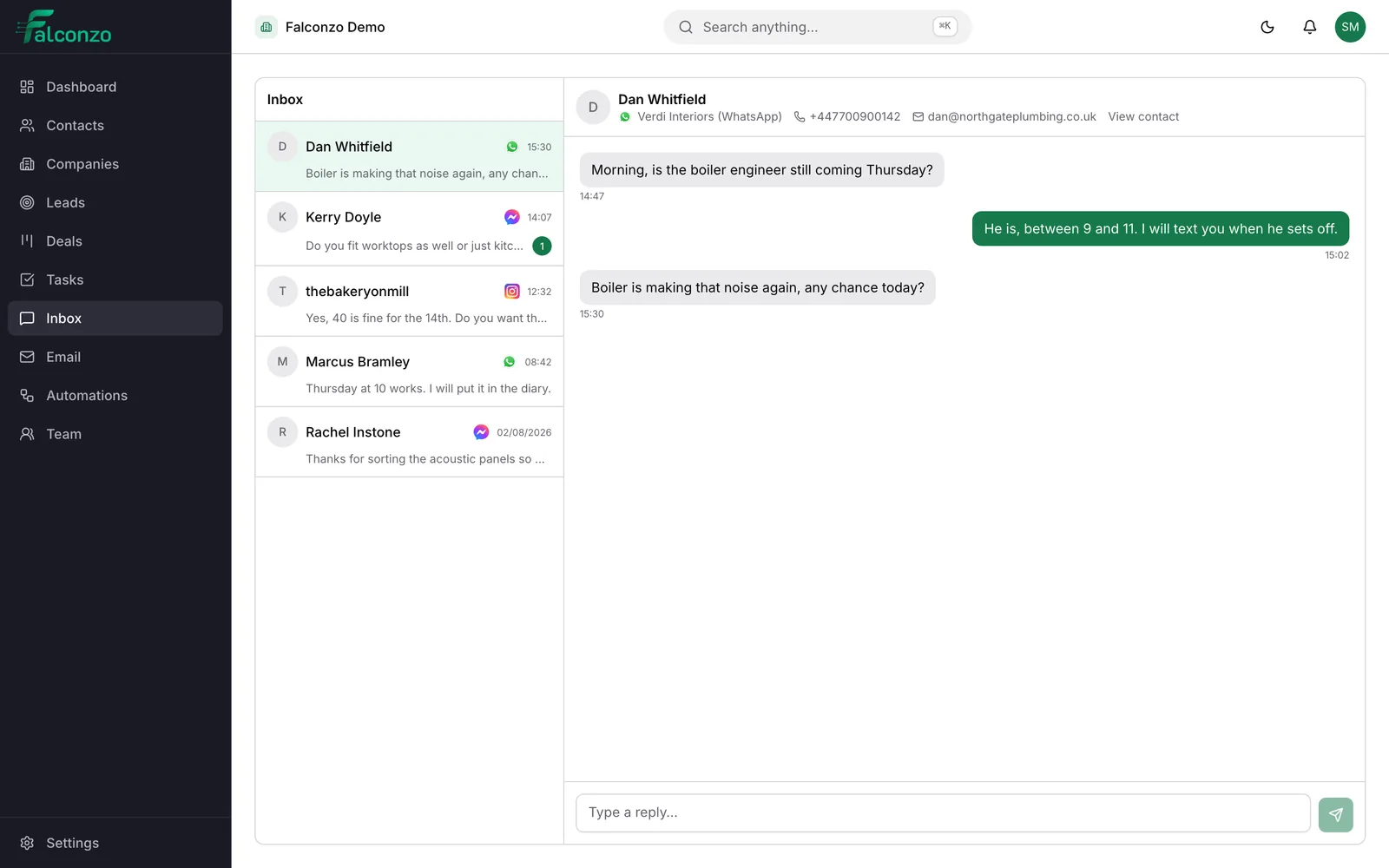
WhatsApp, Facebook Messenger and Instagram direct messages arrive in the same shared inbox in Falconzo, where your team can reply and attach the conversation to the customer it belongs to.
Why one queue beats four apps
Customers choose the channel. A business that answers on all of them separately pays for it in missed messages.
Most small teams end up with a phone for WhatsApp, a browser tab for the Facebook Page, another for Instagram and a mailbox for everything else. Each one has its own idea of what is unread, and only the person holding the phone knows what was promised.
The messages themselves are rarely the problem. The gaps are: a question answered twice by two people, a quote nobody chased, a regular customer treated like a stranger because the last conversation happened on a channel this person never opens.
Falconzo puts the messaging channels in one shared inbox and lets you attach each conversation to a record. The channel stops mattering to you, which is the only way it can stop mattering to the customer.
What the shared inbox does
Connect the channels your customers use, answer from one screen, and keep the result on the record.
Three messaging channels, one queue
WhatsApp, Facebook Messenger and Instagram direct messages arrive in the same shared inbox instead of three apps on three phones.
Answer from Falconzo
Replies go out on the channel the customer used. They carry on the conversation where they started it and never notice a handover.
Linked to the customer record
Attach a conversation to the contact, company, lead or deal it belongs to, so the exchange is part of the history rather than a private chat.
Email in the same place
Your connected mailbox works alongside the messaging queue, with the same idea behind it: the conversation belongs next to the record.
Lead forms feed the same pipeline
A Facebook or Instagram lead form creates a lead in Falconzo, so an advert and a direct message end up in one place rather than two.
Under your control
Each channel is connected through the provider's own authorisation screen, and anyone with the right permission can disconnect it from settings.
A normal morning in a shop with three channels
Nothing unusual happens here. That is rather the point.
Connect the channels you actually use
Connect your WhatsApp number, your Facebook Page and your Instagram account through each provider's own authorisation screen. Nothing changes for the customer: the number and the profiles they already message stay the same.
Open one list in the morning
Three enquiries came in overnight: a WhatsApp message about a repeat order, a Messenger question about opening hours, and an Instagram direct message asking whether you deliver. They are in one queue with the channel marked on each, so nobody is checking a phone under the counter.
Work out who is talking to you
The repeat order is from a number your team recognises, and one click links the conversation to that contact. The Instagram message is from someone new, so it stays unlinked until you know who they are.
Reply where they started
Each answer goes back out on its own channel from the same screen. The customer keeps the thread they opened and nobody is copying an address between two windows.
Leave the record better than you found it
The repeat order becomes a task on the contact for tomorrow morning. The delivery question becomes a lead, so the follow-up is somebody's job rather than something remembered on the drive home.
Anyone can pick it up next time
A week later the same customer emails instead of messaging. The linked record already shows what was asked and promised, so whoever takes the email is not starting from nothing.
One screen
The channel is a detail, not a destination
A conversation in the shared inbox shows which channel it arrived on, who sent it and what has been said. Answering it is the same action whichever channel it came from.
That matters most when the team is small. One person covering the counter, the phone and the Page does not have to remember which app has the unanswered message in it, because there is one list and it is either empty or it is not.
- WhatsApp, Facebook Messenger and Instagram direct messages in one place
- Replies go out on the channel the customer chose
- Each channel is connected, and can be disconnected, from settings
The record
A conversation is worth more when it is attached to somebody
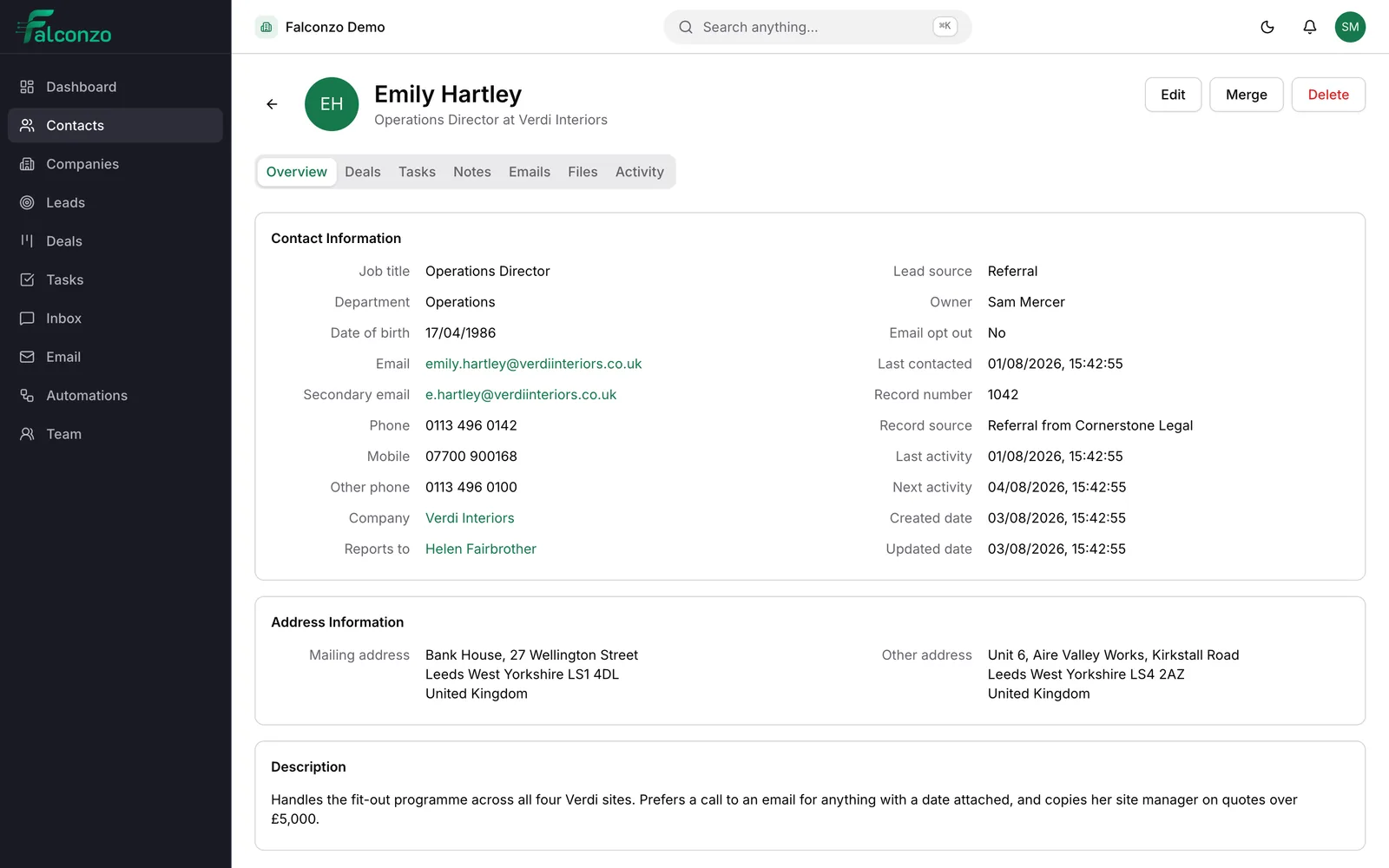
Link a conversation to a contact, company, lead or deal and it becomes part of that record rather than a chat log only one person has seen.
The value shows up later. When the same customer comes back through a different channel, or a colleague takes the enquiry while you are out, the record already carries what was asked, what was answered and what was promised.
From there it behaves like anything else in Falconzo. Add a task, write a note, raise a deal, or convert a first-time enquiry into a lead you can follow properly.
- Conversations attach to contacts, companies, leads and deals
- Tasks and notes on the record keep the follow-up visible
- Email conversations sit beside messaging on the same records
What you end up with
One place to look, and one definition of an answered message. New enquiries stop depending on whoever happens to be holding the business phone.
Customers get continuity. They message on Instagram in March and email in June, and your side of the conversation remembers both, because both are on the record.
Related pages




Answer messages sent to your business number, linked to the customer they came from.
Read moreFacebook Messenger
Handle the questions your Facebook Page attracts without living inside the Page inbox.
Read moreTurn direct messages into customers you can find again by name.
Read more
Emily Hartley
Verdi Interiors
The connected mailbox, thread matching and shared conversations that sit beside this inbox.
Read more
Request a quote
Emily Hartley
[email protected]
Office fit-out
New lead created
Meta lead forms
Facebook and Instagram form submissions arriving in Falconzo as leads.
Read moreMeta integration
What connecting a Facebook Page, an Instagram account or a WhatsApp number involves.
Read moreBring your channels into one inbox
Book a walkthrough and we will go through the channels your customers use and what your team would see when a message arrives.